---
title: "Session Manager API Guide"
description: "Session manager generates a mixed content URL with the information of the playback session."
---
> For the complete documentation index, see [llms.txt](/llms.txt).
import YouTubeEmbed from '../../../../../components/YouTubeEmbed.astro';
import { LinkButton } from '@astrojs/starlight/components';
After pre-processing of watermark, the '0' and '1' versions of content (DASH or HLS) are mixed in real time and delivered to the client on the user's playback request. DoveRunner Forensic Watermarking service provides the session manager which generates the mixed content URL with the information of the playback session.
The service site can stream the mixed content to the client according to the mixed URL through CDN integration such as Amazon CloudFront and Akamai CDN.
```mermaid
sequenceDiagram
participant B as Service site
participant D as DoveRunner service
B ->> D: Content URL, Session data
Note right of D: Session manager
D -->> D: Generate session key(payload) and store session data
D ->> B: Send Session URL
```
## Supported Integration Specification
The session api supports two request specifications.
- pallycon-apidata (aes encryption)
- jwt token authentication
If the authorization header is included in the Http Header, it operates in the JWT.
:::note[Choosing wmt_type]
Don't confuse the request specification above with the `wmt_type` value you send inside the Session URL / Watermark Token API payload — that field controls the **watermark token format returned for the CDN embedder**, and the correct value depends on which CDN you use:
- `aes` (default) — for [Amazon CloudFront](../cloudfront-embedder/) integration
- `jwt` — for [Akamai](../akamai-integration/) and Fastly integration (**required** for Akamai — see the Akamai CDN Integration Guide)
:::
## Tutorial Video
This video is a tutorial about how to generate a session URL using session manage API sample. (refer to the last part of the video)
## DoveRunner HTTP API Specification
The HTTP API requests used by the DoveRunner service follow the specifications below.
> Please find the API request sample code in [Sample Download page](/content-security/forensic-watermarking/getting-started/fwm-downloads/).
### Request
|Param key|Value|
|---|---|
|pallycon-apidata|base64 Encoding ( JSON string )|
#### Request Data JSON Format
```json
{
"data":"{aes256 cbc encryption of 'API data' for each API, and base64 encoding}",
"timestamp":"{yyyy-mm-ddThh:mm:ssZ}",
"hash":"{sha256 hash of 'message format' in base64 string}"
}
```
**Request Data Specification**
| Key | Type | Required | Description |
|-------------|------|----------|-----------|
| `data` | String | Y | AES encryption on the JSON string generated by the specification for each API, and the result value is input as a base64 string. |
| `timestamp` | String | Y | Enter the time of the request at the GMT time zone in "yyyy-mm-ddThh: mm: ssZ" format. |
| `hash` | String | Y | Enter the hash value generated according to the following specification. |
**AES256 Encryption**
Aes256 encryption / decryption processing is performed as below using the site key value issued when joining DoveRunner service. (Check DoveRunner Console site)
- mode : CBC
- AES key : 32 byte (Site key issued from DoveRunner Console site)
- AES IV : fixed 16 byte (0123456789abcdef)
- padding : pkcs7
**SHA256 message Format**
The input value of the SHA256 hash is a combination of the following strings.
```txt
[site access key] + [site_id] + [json.data] + [json.timestamp]
```
- site access key: It is the access key value that is issued when creating DoveRunner cloud service site. It can be checked on the DoveRunner Console page.
:::caution[Binary, not hex]
The output of the SHA256 hash must be base64-encoded from its raw **binary** digest — not from a hex-string representation of the hash. Encoding the hex string instead of the binary digest is a common mistake and produces a hash verification failure (`A1007`) with no other useful error detail.
:::
## JWT Authorization Specification
You can call the Session API by setting the data issued through the token api in the `Authorization` header.
### Authentication Token
When calling the Session API, you need to set an authentication token issued by the process below.
**Step 1: Generate the base64 encoded Authorization parameter**
1. Navigate to [Base64 Enc/Dec page](https://devconsole.doverunner.com/common-tools/#base64) on DoveRunner DevConsole.
2. While `Encrypt` option is selected, enter the `AccountID:AccessKey` value in the left text field.
3. Base64 encoded output will be displayed as the screenshot below.
4. Copy the output value to use in the next step.
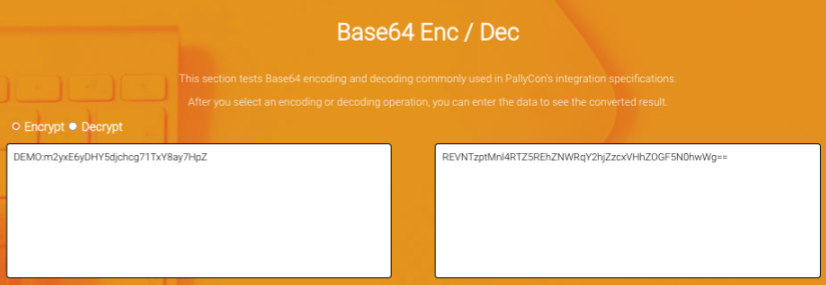
> You need to input the `AccountID` and `AccessKey` values for your DoveRunner service account.
**Step 2: Use the parameter value to generate the Authorization token.**
Call the token API URL with base64 encoded value in the `Authorization` request header.
- URL: `https://fwm-session.doverunner.com/api/v2/token/{siteId}`
- Method: GET
#### Path Parameter
| Parameter | Format | Description |
| --- | --- | --- |
| siteId | four alphanumeric characters | Your DoveRunner Site ID shown on Console |
#### Request Header
| Name | Description |
| --- | --- |
| Authorization | Basic Auth : Basic base64encode(accountId:accessKey) |
**Sample Request**
```
GET /api/v2/token/DEMO HTTP/1.1
Authorization: basic authInfo
Host: fwm-session.doverunner.com
```
#### Response Data Fields
| Field Name | Type | Info |
| --- | --- | --- |
| error_code | String | error code |
| error_message | String | error message |
| data.token | String | api auth token |
**Sample Response**
```json
HTTP/1.1 200 OK
Content-Type: application/json;charset=UTF-8
Content-Length: 112
{
"error_code" : "0000",
"error_message" : "Success.",
"data" : {
"token" : "Bearer valid-token"
}
}
```
### API Request Header
You can call the Session API by setting the data issued through the token api in the authorization header.
#### Common Response Specifications
**Response Status**
| HTTP Status Code | Description |
| --- | --- |
| Error code | Description |
| 401 | Incorrect JWT Token specification or user information not found |
| 403 | You do not have permission to use the API. |
| 200 | Success |
**Response Data Fields**
| **Key** | **type** | **Value** |
| --- | --- | --- |
| error_code | String | 0000: Success / Other values indicate failure |
| error_message | String | Error message |
| data | Json | Api result |
## Session URL API
:::note
Even if you enable the `revoke_flag` in the Session URL API or Watermark Token API, the feature can only be used after completing the AWS Infra setup and registering AWS SNS.
In addition, this is available **only for live content**. For more details, please refer to [Session Revocation Guide](../../detecting/session-revocation-guide/)
:::
An API that requests the `session URL` to play watermarked video on the client. The input values of the request are the URL of the watermark preprocessing result and the session information (forensic mark) to be inserted as a forensic watermark of the stream.
### Request
- Called by DoveRunner HTTP API specification
- URL : `https://fwm-session.doverunner.com/api/v2/session/watermarkUrl/{site_id}`
- Method: GET
> You need to replace 'site_id' part with your siteID issued by DoveRunner console.
#### API Data JSON Format
```json
{
"domain": {domain},
"output_path": {output_path},
"cid": {cid},
"streaming_format": {dash/hls},
"cmaf": {true/false},
"forensic_mark": {forensic_mark},
"wmt_type": {aes/jwt},
"prefix_folder": "wm-contents",
"revoke_flag": {true/false}
}
```
**API data specification**
| Key | Type | Required | Description |
|--------------------|---------|---------------|----------------------------------------------------------------------------------------------------------------------------------------------------------------------------------------------------------------|
| `domain` | String | Y | Domain of content URL (e.g. cdn.yoursite.com) |
| `output_path` | String | Y | The output_path that was entered when requesting watermark packaging. If preprocessing was done via T&P, this is the same value as the **Output Directory Path** (`output.path` in the API) you set when creating the T&P job — see [T&P Service Guide](/content-security/tnp/tnp-service-guide/). |
| `cid` | String | Y | Unique content ID |
| `streaming_format` | String | Y | Streaming protocol (`dash` or `hls`) |
| `cmaf` | Boolean | N | cmaf file flag (default : false) |
| `forensic_mark` | String | Y | Session data to be inserted as watermark (such as end user ID, device info, etc.), max 254 byte characters |
| `wmt_type` | String | N | Watermark data format used for session URL (default: aes)
- `aes`: DoveRunner's own specification used for CloudFront CDN integration
- `jwt`: JWT format used for Akamai and Fastly CDN integration |
| `prefix_folder` | String | N (Y for T&P) | In case of FWM content packaged by T&P service, enter the `wm-contents` value here. |
| `revoke_flag` | String | N | Revocation applied (default: false) |
### Response
#### Response Data JSON Format
```json
{
"error_code": {error_code},
"error_message": {message},
"data": {watermark_url}
}
```
**Response data specification**
| Key | Type | Required | Description |
| ---- | ---- | --- | -------------- |
| error_code | String | Y | "0000" if succeeded, alphanumeric error code if failed |
| error_message | String | Y | Error message |
| data | String | N | If succeeded, returns the Session URL. Please see below for detailed Session URL format |
- URL format for CloudFront (aes type): `/dldzkdpsxmdnjrtm/////`
- Revocation applied URL: `/dldzkdpsxmdnjrtm/.////`
- URL format for Akamai/Fastly (jwt type): `/////`
- Session URL specification
| Item | Description |
|----------------------|---------------------------------------------------------------------------|
| `content CDN domain` | Domain name of content's CDN. Set based on the domain in the request data |
| `dldzkdpsxmdnjrtm` | Pre-defined keyword for CloudFront integration |
| `encrypted payload` | Encrypted session key (payload) for CloudFront |
| `WMT` | Session key (payload) in JWT (JSON Web Token) for Akamai and Fastly |
| `output_path` | Path of the packaging output on the storage. |
| `cid` | Unique ID of the content (ContentID) |
| `stream format` | Streaming protocol of content. (`dash` or `hls`) |
| `manifest file` | Manifest filename (`stream.mpd` or `master.m3u8`) |
## Watermark Token API
API to directly request watermark token data (`Encrypted payload` or `WMT`) used in `Session URL`. This can be used when you want to construct a session URL with an arbitrary specification, instead of using the `Session URL API` with a fixed format such as content path, CID, and streaming type.
:::note
To play a session URL arbitrarily configured through the `Watermark Token API`, you need to implement the CDN Edge's watermark embedding (A/B Switching) logic yourself. Therefore, the token API can only be used if the customer directly implements or customizes the watermark embedding on the CDN edge.
When using the CloudFront sample provided by DoveRunner or Akamai CDN integration, we recommend using the `Session URL API` instead of the Token API.
:::
### Request
- Called by DoveRunner HTTP API specification
- URL : `https://fwm-session.doverunner.com/api/v2/session/watermarkToken/{site_id}`
- Method: GET
> You need to replace ‘site_id’ part with your siteID issued by DoveRunner console.
#### API Data JSON Format
```json
{
"forensic_mark": {forensic_mark},
"wmt_type": {aes/jwt},
"streaming_format": {dash/hls},
"cmaf": {true/false},
"revoke_flag": {true/false}
}
```
**API Data Specification**
| Key | Type | Required | Description |
|--------------------|---------|----------|----------------------------------------------------------------------------------------------------------------------------------------------------------------------------------------------------------------|
| `forensic_mark` | String | Y | Session data to be inserted as watermark (such as end user ID, device info, etc.), max 254 byte characters |
| `wmt_type` | String | N | Watermark data format used for session URL (default: aes)
- `aes`: DoveRunner's own specification used for CloudFront CDN integration
- `jwt`: JWT format used for Akamai and Fastly CDN integration |
| `streaming_format` | String | Y | Streaming protocol of content. (`dash` or `hls`) |
| `cmaf` | Boolean | N | cmaf file flag (default : false) |
| `revoke_flag` | String | N | Revocation applied (default: false) |
### Response
#### Response Data JSON Format
```json
{
"error_code": {error_code},
"error_message": {message},
"data": {watermark_token_data}
}
```
- Revocation applied Token: `.`
**Response Data Specification**
| Key | Type | Description |
|---------------|--------|----------------------------------------------------------------------------------------------------------------------------------------------------------------------------------------------------|
| error_code | String | "0000" if succeeded, alphanumeric error code if failed |
| error_message | String | Error Message |
| data | String | If successful, depending on the value of the `wmt_type` in the request data, either `Encrypted Payload` for CloudFront integration or `WMT` token value for Akamai/Fastly integration is returned. |
## Session List API
An API that can inquire the session information created through the `Session URL API`. The same information can be viewed on the DoveRunner Console site as well.
### Request
- Called by DoveRunner HTTP API specification
- URL : `https://fwm-session.doverunner.com/api/v2/session/list/{site_id}`
- Method: GET
> You need to replace ‘site_id’ part with your siteID issued by DoveRunner console.
#### API Data JSON Format
```json
{
"keyword": {search keyword},
"search_keyword_type": {watermark, sessionKey},
"from": {yyyymmddhhmmss},
"to": {yyyymmddhhmmss},
"page_unit": {long value},
"last_key": {string},
"last_created_time": {yyyymmddhhmmss}
}
```
**API Data Specification**
| Key | Type | Required | Description |
| ---- | ----- |----------|---------------------------------------------------------------------------------------------------------|
| `keyword` | String | N | When searching for a keyword for the result, enter a keyword that corresponds to the search type below. |
| `search_keyword_type` | String | N | Keyword search type (`watermark` or `sessionKey`) |
| `from` | String | N | Search start date based on session API request time (yyyyMMddHHmmss format in GMT timezone) |
| `to` | String | N | Search End Date (yyyyMMddHHmmss format in GMT timezone) |
| `page_unit` | Long | N | Number of items to search (default: 25) |
| `last_key` | String | N | Last retrieved session key |
| `last_created_time` | String | N | Generation time of the last retrieved session key (yyyyMMddHHmmss format in GMT timezone) |
### Response
#### Response Data JSON Format
```json
{
"error_code": {error_code},
"error_message": {message},
"count": {watermark_url},
"lastKey": {
"key": {sessionKey},
"createdTime": {YYMMDDhhmmss}
},
"data": [{
"key": {sessionKey},
"forensicMark": {watermark},
"createdTime": {YYMMDDhhmmss}
}]
}
```
**Response Data Specification**
| Key | Type | Description |
| ---- | ---- | -------------- |
| `error_code` | String | “0000” if succeeded, alphanumeric error code if failed |
| `error_message` | String | Error Message |
| `count` | String | Number of items retrieved |
| `lastKey` | Json | Last retrieved session key information |
| `data` | Json Array | List of retrieved session information |
**lastKey**
| Key | Type | Description |
| ---- | ---- | -------------- |
| `key` | String | Last retrieved session key |
| `createdTime` | String | Creation date of the last retrieved session key (yyyyMMddHHmmss format in GMT timezone) |
**data**
| Key | Type | Description |
| ---- | ---- | -------------- |
| `key` | String | Last retrieved session key |
| `forensicMark` | String | Watermark information entered through session API request data (e.g. end user ID, IP address) |
| `createdTime` | String | Creation date of the last retrieved session key (yyyyMMddHHmmss format in GMT timezone) |
## Session Success List API
An API that retrieves session success details generated via the Session URL API. This success information is also available on the DoveRunner Console.
### Request
- Called by DoveRunner HTTP API specification
- URL : `https://fwm-session.doverunner.com/api/v2/session/success/{site_id}`
- Method: GET
> You need to replace ‘site_id’ part with your siteID issued by DoveRunner console.
#### API Data JSON Format
```json
{
"keyword": {search keyword},
"search_keyword_type": {watermark, sessionKey},
"from": {yyyymmddhhmmss},
"to": {yyyymmddhhmmss},
"page_unit": {long value},
"page_index": {long value}
}
```
**API Data Specification**
| Key | Type | Required | Description |
| ---- | ----- |----------|---------------------------------------------------------------------------------------------------------|
| `keyword` | String | N | When searching, please enter a keyword that matches one of the search types listed below. |
| `search_keyword_type` | String | N | Keyword search type (`watermark` or `sessionKey`) |
| `from` | String | N | Search start date based on session API request time (yyyyMMddHHmmss format in GMT timezone) |
| `to` | String | N | Search End Date (yyyyMMddHHmmss format in GMT timezone) |
| `page_unit` | Long | N | Number of items to search (default: 25) |
| `page_index` | Long | N | Page index (default: 1) |
### Response
#### Response Data JSON Format
```json
{
"error_code": {error_code},
"error_message": {message},
"count": {watermark_url},
"data": [{
"key": {sessionKey},
"forensicMark": {watermark},
"createdTime": {YYMMDDhhmmss}
}]
}
```
**Response Data Specification**
| Key | Type | Description |
| ---- | ---- | -------------- |
| `error_code` | String | "0000" indicates success; an alphanumeric error code will be returned if the operation fails. |
| `error_message` | String | Error Message |
| `count` | String | Number of items retrieved |
| `data` | Json Array | List of retrieved session information |
**data**
| Key | Type | Description |
| ---- | ---- | -------------- |
| `key` | String | Last retrieved session key |
| `forensicMark` | String | Watermark information entered through session API request data (e.g. end user ID, IP address) |
| `createdTime` | String | Creation date & time of the last retrieved session key (yyyyMMddHHmmss format in GMT timezone) |
## Session Fail List API
An API that retrieves session failure details generated via the Session URL API. This failure information is also available on the DoveRunner Console.
### Request
- Called by DoveRunner HTTP API specification
- URL : `https://fwm-session.doverunner.com/api/v2/session/success/{site_id}`
- Method: GET
> You need to replace ‘site_id’ part with your siteID issued by DoveRunner console.
#### API Data JSON Format
```json
{
"keyword": {search keyword},
"search_keyword_type": {watermark, sessionKey},
"from": {yyyymmddhhmmss},
"to": {yyyymmddhhmmss},
"page_unit": {long value},
"page_index": {long value}
}
```
**API Data Specification**
| Key | Type | Required | Description |
| ---- | ----- |----------|---------------------------------------------------------------------------------------------------------|
| `keyword` | String | N | When searching, please enter a keyword that matches one of the search types listed below. |
| `search_keyword_type` | String | N | Keyword search type (`watermark` or `sessionKey`) |
| `from` | String | N | search start date & time based on session API request (yyyyMMddHHmmss format in GMT timezone) |
| `to` | String | N | Search End Date (yyyyMMddHHmmss format in GMT timezone) |
| `page_unit` | Long | N | Number of items to search (default: 25) |
| `page_index` | Long | N | Page index (default: 1) |
### Response
#### Response Data JSON Format
```json
{
"error_code": {error_code},
"error_message": {message},
"count": {watermark_url},
"data": [{
"key": {sessionKey},
"forensicMark": {watermark},
"createdTime": {YYMMDDhhmmss}
}]
}
```
**Response Data Specification**
| Key | Type | Description |
| ---- | ---- | -------------- |
| `error_code` | String | "0000" indicates success; an alphanumeric error code will be returned if the operation fails. |
| `error_message` | String | Error Message |
| `count` | String | Number of items retrieved |
| `data` | Json Array | List of retrieved session information |
**data**
| Key | Type | Description |
| ---- | ---- | -------------- |
| `errorCode` | String | Session fail error code |
| `forensicMark` | String | Watermark information entered through session API request data (e.g. end user ID, IP address) |
| `createdTime` | String | Creation date of the last retrieved session key (yyyyMMddHHmmss format in GMT timezone) |
## Session Manager API error codes
:::note
Among the error codes below, the items for which solutions are not specified are errors that the customer cannot directly solve. In case of those errors, please contact us through Helpdesk.
:::
| error code | state | Cause | Solution |
| ---- | ---- |-----------------------------------------------------------------------------------------------|--------------------------------------------------------------------------------------------------------------------------------------------------------------------------------------------------------------|
| 0000 | API response success | | |
| A1000 | API parameter error | The parameter of the API URL is null or an invalid value was entered. | Follow the API guide and enter the correct parameters to call again. |
| A1002 | Timestamp format error | Invalid format of `timestamp` inside `pallycon-apidata`. | Enter the `timestamp` value as GMT time in the format `yyyy-mm-ddThh:mm:ssZ`. |
| A1003 | Site ID value not found | The site ID is missing or an incorrect value was entered in the API parameter. | Check and apply the correct site ID (four-digit alphanumeric) value on the DoveRunner Console site. |
| A1006 | Site key decryption failed | The `data` part of `pallycon-apidata` was encrypted with the wrong site key. | Check and apply the correct site key value on the DoveRunner Console site. |
| A1007 | Hash verification failed | The hash value of the API request data was generated incorrectly. | Apply the correct hash value by referring to the API guide document. |
| A1008 | Database connection failure | Failed to connect to the database internally in the API server. | |
| A1010 | Please check required request parameters.| The required request parameters are missing. |
| A1915 | Site ID value error | The site ID is missing or an incorrect value was entered in the API parameter. | Check and apply the correct site ID value on the DoveRunner Console site. |
| A1916 | Watermark data length error | The length of the watermark data entered in the `forensic_mark` item exceeded 254 bytes. | Enter the value shorter than 254 bytes. |
| A1917 | Trial limit exceeded | The session API call limit (up to 1,000) applied to the trial account has been exceeded. | Switch to a commercial account or, if necessary, request a trial limit reset through the Helpdesk. |
| A1918 | Forensic watermark service suspended | Trial has expired or commercial service has been discontinued. | If you are a trial customer, switch to the commercial plan or request a trial extension from the Console if necessary. If this error occurs while using the commercial plan, please contact us via Helpdesk. |
| A2001 | Missing parameter required to generate watermark URL | A parameter required for the API input data is missing. | Apply the correct input value by referring to the API guide document. |
| A2002 | Trial limit related error | Failed to update trial count due to database connection error. | |
| A2003 | Streaming format input error | The `streaming_format` input is missing or invalid. | Type `dash` or `hls` exactly depending on the format of your target stream. |
| A2004 | API input data parsing failed | Data that does not conform to the specifications has been entered. | Generate `pallycon-apidata` correctly by referring to the API guide document. |
| A2005 | Missing parameter required to generate watermark tokens | A parameter required for the API input data is missing. | Apply the correct input value by referring to the API guide document. |
| A4002 | Failed to save watermark data | Failed to save watermark data due to an internal database connection error in the API server. | |
| A4003 | Watermark data creation failure | Failed to generate watermark data due to an internal system error. | |
| A5001 | Akamai cert key not registered | The certification key required for Akamai CDN integration could not be found. | Request Akamai cert key registration through the Helpdesk. |
| A5002 | Akamai integration token error | An internal error has occurred with the Akamai watermark token. | |
| A7008 | API data parsing failed | The value of `pallycon-apidata` is missing or incorrectly created. | Generate `pallycon-apidata` correctly by referring to the API guide document. |
| A7009 | API version error | An unsupported API version was used. | Check the version information in the API URL to use the correct version. |
| A7010 | Date format error | The date format of the parameters `from` and `to` is incorrect. | Use date data in `YYYY-MM-DD` format. |
| A9001 | Token value is invalid | JWT token value is invalid. | Check the basic token format. |
| A9002 | Token payload value is invalid | JWT token payload value is invalid. | |
| A9008 | Account information not available | Your account has no exactly value. | Check value in your account. |
## Step-by-Step Guide with Example for pallycon-apidata (Session URL API)
The guide below shows step-by-step how to generate request data and get a response for the `Session URL API`. Other APIs, such as `Session List API`, can be applied in a similar way.
In addition to the below step-by-step example, please also refer to our sample codes uploaded on Github.
|Sample Type |GitHub Link |
|---|---|
|Python| [https://github.com/inka-pallycon/pallycon-wm-api-request-sample-python](https://github.com/inka-pallycon/pallycon-wm-api-request-sample-python) |
|Java| [https://github.com/inka-pallycon/pallycon-wm-api-request-sample-java](https://github.com/inka-pallycon/pallycon-wm-api-request-sample-java) |
:::note
The input values used in the example are for reference only. For actual operation, you must enter the values corresponding to your DoveRunner account.
:::
### Step 1 - Prepare API Request Data JSON
#### Example JSON for the API data
```json
{
"domain": "cdn.service-site.com",
"output_path": "output",
"cid": "content1",
"streaming_format": "dash",
"forensic_mark": "testmark.1234567",
"wmt_type": "aes",
"prefix_folder": "wm-contents"
}
```
### Step 2 - AES256 encryption of the API data
- Where to test : https://www.devglan.com/online-tools/aes-encryption-decryption
- Mode: CBC
- Key size: 256
- IV: 0123456789abcdef
- Secret key: cUk29dLagiJ0FGiK681tFIR75ETESe0S (Input your site key shown on DoveRunner Console)
- Output format: base64 text
#### Result of step 2
```txt
ra2Q7t5DTIImHYsOcARkiG5/cuXfa/nB4jR3IVBRUVDZBxvqK+zQXcTv2bljMGAyt03WDXbMex5KzrSTIrDbWuDkX0juIMdngoHaS8WKX6fhDlKJ/AkBaUEcF5SkAOmfYgCs7cURH3gwgZ1rrJ6WyBD09vLoqHqAs61a5Mrqv342TYqooCjibcsSYQujXkzfAgLTD390Eiakf/MkWMVVSjw0GP3LZkbnl67SiVwo58aW6ZTz/jnlKCuoz/zicUEa58KLmPzDBJjP8i+VhdRw8Q==
```
### Step 3 - Generate hash
- site access key: A3DfypNw0bLgR3FAa5Q2TbS1iiUK4iIf (Input your access key shown on DoveRunner Console)
- site ID: EXPL (Input your site ID shown on DoveRunner Console)
- api data: the result from step 2
- timestamp: 2021-09-07T02:15:00Z
#### Combined string before hash
```txt
A3DfypNw0bLgR3FAa5Q2TbS1iiUK4iIfEXPLN5CNHHCgEPVDFBpgtHzraqNUzBZoy4pzx3fSDnzHDMek5AMlmWSlII67tNQ2MJP1NL+dSjQZlEnXp7+ATXOopJEdH1KIZ0jNjY19bRLl9aG0gJSsbS6krhNxuuDzLayT/CgPwQUge1hQj1U2xtXSbDFUfiXSFZtJLSlA/QdTwTC5NpxfLjBmtRspPh1AOuKNwgiS9HuJxV9f6NDK22unYrzZyq6HG+qNEY6O3kp8GdRkdTU62U4t9J/byiAtEkLT2021-09-07T02:15:00Z
```
#### Result of step 3
- sha256 + base64 output - where to test: https://hash.online-convert.com/sha256-generator
```txt
Z4f4gAJPeJUytea8f4DXg7jz+vAkmzNVQEiaU7QO3tA=
```
### Step 4 - Build request data JSON and base64 encode
- 'data': the result of step 2
- 'timestamp': the same timestamp as in step 3
- 'hash': the result of step 3
#### JSON data
```json
{
"data": "N5CNHHCgEPVDFBpgtHzraqNUzBZoy4pzx3fSDnzHDMek5AMlmWSlII67tNQ2MJP1NL+dSjQZlEnXp7+ATXOopJEdH1KIZ0jNjY19bRLl9aG0gJSsbS6krhNxuuDzLayT/CgPwQUge1hQj1U2xtXSbDFUfiXSFZtJLSlA/QdTwTC5NpxfLjBmtRspPh1AOuKNwgiS9HuJxV9f6NDK22unYrzZyq6HG+qNEY6O3kp8GdRkdTU62U4t9J/byiAtEkLT",
"timestamp":"2021-09-07T02:15:00Z",
"hash":"Z4f4gAJPeJUytea8f4DXg7jz+vAkmzNVQEiaU7QO3tA="
}
```
#### Result of step 4 (base64 encoded JSON)
```txt
ewogICAgImRhdGEiOiAiTjVDTkhIQ2dFUFZERkJwZ3RIenJhcU5VekJab3k0cHp4M2ZTRG56SERNZWs1QU1sbVdTbElJNjd0TlEyTUpQMU5MK2RTalFabEVuWHA3K0FUWE9vcEpFZEgxS0laMGpOalkxOWJSTGw5YUcwZ0pTc2JTNmtyaE54dXVEekxheVQvQ2dQd1FVZ2UxaFFqMVUyeHRYU2JERlVmaVhTRlp0SkxTbEEvUWRUd1RDNU5weGZMakJtdFJzcFBoMUFPdUtOd2dpUzlIdUp4VjlmNk5ESzIydW5ZcnpaeXE2SEcrcU5FWTZPM2twOEdkUmtkVFU2MlU0dDlKL2J5aUF0RWtMVCIsCiAgICAidGltZXN0YW1wIjoiMjAyMS0wOS0wN1QwMjoxNTowMFoiLAogICAgImhhc2giOiJaNGY0Z0FKUGVKVXl0ZWE4ZjREWGc3anordkFrbXpOVlFFaWFVN1FPM3RBPSIKfQ==
```
### Step 5 - Call DoveRunner API URL with the data
- API URL: https://fwm-session.doverunner.com/api/v2/session/watermarkUrl/EXPL (`EXPL` should be replaced with your site ID)
- query param key: pallycon-apidata
- param value: the result of step 4
### Combined API URL
```txt
https://fwm-session.doverunner.com/api/v2/session/watermarkUrl/EXPL?pallycon-apidata=ewogICAgImRhdGEiOiAiTjVDTkhIQ2dFUFZERkJwZ3RIenJhcU5VekJab3k0cHp4M2ZTRG56SERNZWs1QU1sbVdTbElJNjd0TlEyTUpQMU5MK2RTalFabEVuWHA3K0FUWE9vcEpFZEgxS0laMGpOalkxOWJSTGw5YUcwZ0pTc2JTNmtyaE54dXVEekxheVQvQ2dQd1FVZ2UxaFFqMVUyeHRYU2JERlVmaVhTRlp0SkxTbEEvUWRUd1RDNU5weGZMakJtdFJzcFBoMUFPdUtOd2dpUzlIdUp4VjlmNk5ESzIydW5ZcnpaeXE2SEcrcU5FWTZPM2twOEdkUmtkVFU2MlU0dDlKL2J5aUF0RWtMVCIsCiAgICAidGltZXN0YW1wIjoiMjAyMS0wOS0wN1QwMjoxNTowMFoiLAogICAgImhhc2giOiJaNGY0Z0FKUGVKVXl0ZWE4ZjREWGc3anordkFrbXpOVlFFaWFVN1FPM3RBPSIKfQ==
```
### Response from API server (Final result)
```json
{
"error_message":"Success",
"error_code":"0000",
"url":"https://cdn.service-site.com/wm-contents/OHVPUw4N4tUoc-wlcA72aX6Hj5a_v-HuXcLAbFwYSpwDDsiVdSLNbWnbjkVvTX20yiKw7U6nOmJzZaDep1_3YJYxfvHzof01IAVgAguBhGk=/output/ddb2b84b-c3ce-4f37-9182-c36f83fc3fce/dash/stream.mpd"
}
```
## Example for JWT
This is a Postman Collection that allows you to call APIs using JWT. Please refer to [Postman Collection Guide](https://learning.postman.com/docs/getting-started/importing-and-exporting-data/#importing-data-into-postman) for more details.
Collection JSON file
Environment JSON file